
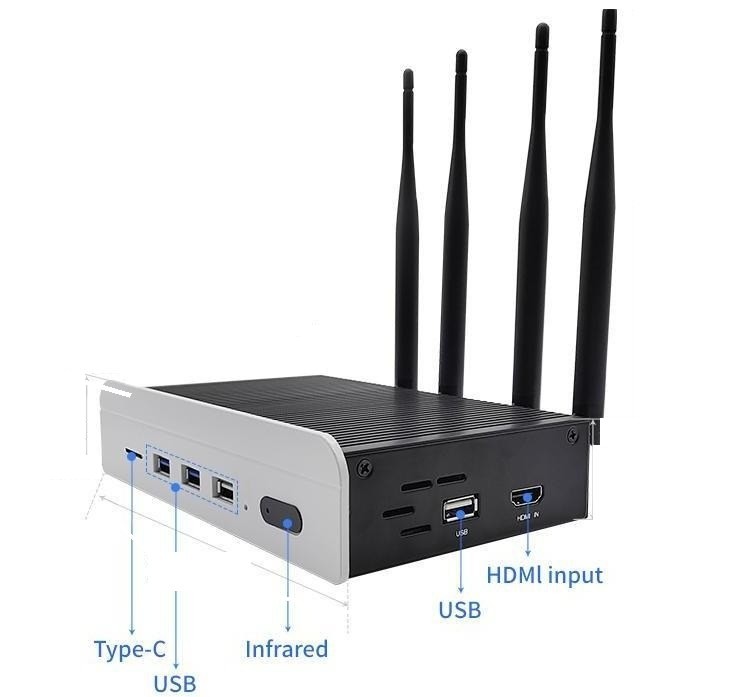
A wireless presentation device for meeting rooms and classrooms. Up to 128 people can share from phones, tablets and laptops with AirPlay, Miracast, Chromecast, DLNA or a USB dongle, over dual HDMI outputs with 4K on the main display.
Specifications as per the official Bronx datasheet (V.01). Specifications may change without prior notice.
BXA-SP1000 is the receiver that lets everyone in the room share a screen without a cable. Connect it to a display or projector with HDMI, and guests can present from a phone, tablet or laptop in seconds. Use AirPlay, Miracast, Chromecast or DLNA, the Bronx client for Windows, macOS, Android and iOS, or the USB transmitter that needs no software setup.
It supports up to 128 connections, drives two displays (one at 4K), and adds mirror-back with annotation, a built-in whiteboard, a 6-digit casting PIN that works across network segments, and BYOM so a laptop can run Teams or Zoom with the room camera and audio. IT teams get a web console for central management, RS232 and an API for control systems.
| Host unit | 1 |
| Wi-Fi antennas | 4 |
| Power adapter | 1 |
| USB transmitters (dongles) | 1 to 4, per configuration |
| CPU | ARM Cortex A55 × 4 |
| Memory / storage | 4 GB DDR + 32 GB Flash |
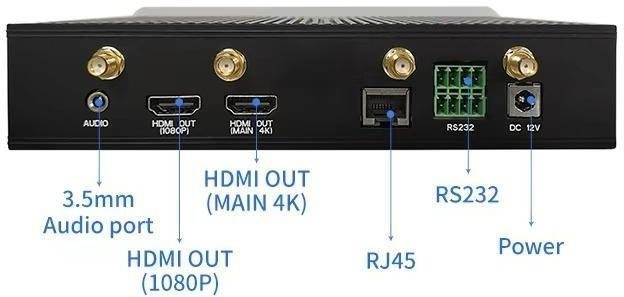
| Video outputs | 2 × HDMI output (1 × 4K 60 Hz; 1 × 1080p 60 Hz) |
| Video input | 1 × HDMI input |
| Audio output | 3.5 mm audio output |
| Control | 2 × RS232 |
| USB | 1 × Type-C host; 2 × USB 3.0 host Type-A; 1 × USB 2.0 host Type-A |
| Network | 1 × RJ45 LAN (10/100/1000) |
| Wireless | 4 × Wi-Fi antennas |
| Power input | 12 V / 3 A DC jack |
| Max power consumption | 12 W |
| Size (L × W × H) | 180 × 110 × 35 mm |
| Operating environment | 0 °C ~ 40 °C; 10% ~ 90% humidity |
| Protocols | DLNA / Miracast / AirPlay / Chromecast / Huawei Cast / BZCcast |
| Dual Wi-Fi | 5.8G SoftAP + 5.8G Wi-Fi |
| Connections | Up to 128 |
| Transmit distance | 70 m with no obstacle |
| BYOM | All major conferencing services, such as Teams, Zoom and GoToMeeting |
| Mirror back | Supported |
| Touch control | USB HID: mouse mode, IR touch control, capacitive touch panel |
| Video decoding | H.264, H.265, VP8, RV, WMV, AVS, H.263, MPEG4; 4K decoding |
| Bridging | Wireless and wired bridging |
| AirPlay / Miracast / Chromecast | DLNA, Miracast, AirPlay, Chromecast, WiDi |
| Wireless USB dongle | Windows, macOS, Linux |
| Mirroring via software | Windows, Android, iOS, macOS |
| Centre management | RS232; API for third-party integrations |
| WebGUI | Built-in web back-end |
| Host mode | Control by mouse, touch or mobile app |
| Rotation | Photos rotate 90°, 180°, 270° |
| Dynamic password | For app mirroring, AirPlay and Windows software mirroring |
| Audio output | HDMI or USB, selectable in settings |
| Scheduled restart | Regular restart for healthy long-term operation |
| Built-in apps | Welcome message, file browser with classification, screensaver |
| Router mode | Connects an external router to extend signal and coverage |
iPhone, iPad, Mac, Windows and Android devices. Cast with AirPlay, Miracast, Chromecast or DLNA, with the Bronx client, or with the plug-and-play USB transmitter.
Dual-band Wi-Fi with a 5.8G SoftAP plus a 5.8G client link, and up to 70 m range in open space.
One 4K 60 Hz and one 1080p 60 Hz output. Show the same screen on both or split users between them (1+N, N+1, N+N).
Show 1, 2, 4, 6 or 9 sources at once: equal split, master and slave, side by side or free layout.
Send the room screen back to a laptop and control it by touch. Set who may annotate, with approval on request.
Plug a USB camera into the unit and use it, with the room audio, in Teams, Zoom or GoToMeeting on the connected laptop.
6- or 8-digit PIN, dynamic or static passwords, per-session approval, host mode with a client list, and optional on-screen watermark.
Forward picture and sound to up to 2 extension receivers on the same LAN or hotspot.
Writing, annotation, screen recording, screenshots, export to PDF or image and send to mobile.
Manage every unit from a web console (cloud or self-hosted server), with RS232 and an API for control systems and scheduled restart.
Tell us how many rooms and users. We will recommend the right setup.